Youtube Channel
scrivimi: fraranux@gmail.com
chiamami: 345 04.22.\pi

Visualizzazione post con etichetta Attiny. Mostra tutti i post

venerdì 28 novembre 2014

Charlie Plexing, Chubby Bunny, addobbi natalizi con l'attiny 85 e altre sventure.

intanto carico il filmatino di un aggeggio che stamane ho appeso alla porta del mio laboratorio,
un bel lavoretto realizzato grazie alla sapiente programmazione di Dario Gavezzone . (La rima imponeva).


Tutta l'elettronica è basata su di un ATtiny 85, qualcosa in merito lo trovate anche QUI!

Lo schema a fritzing è un disastro:
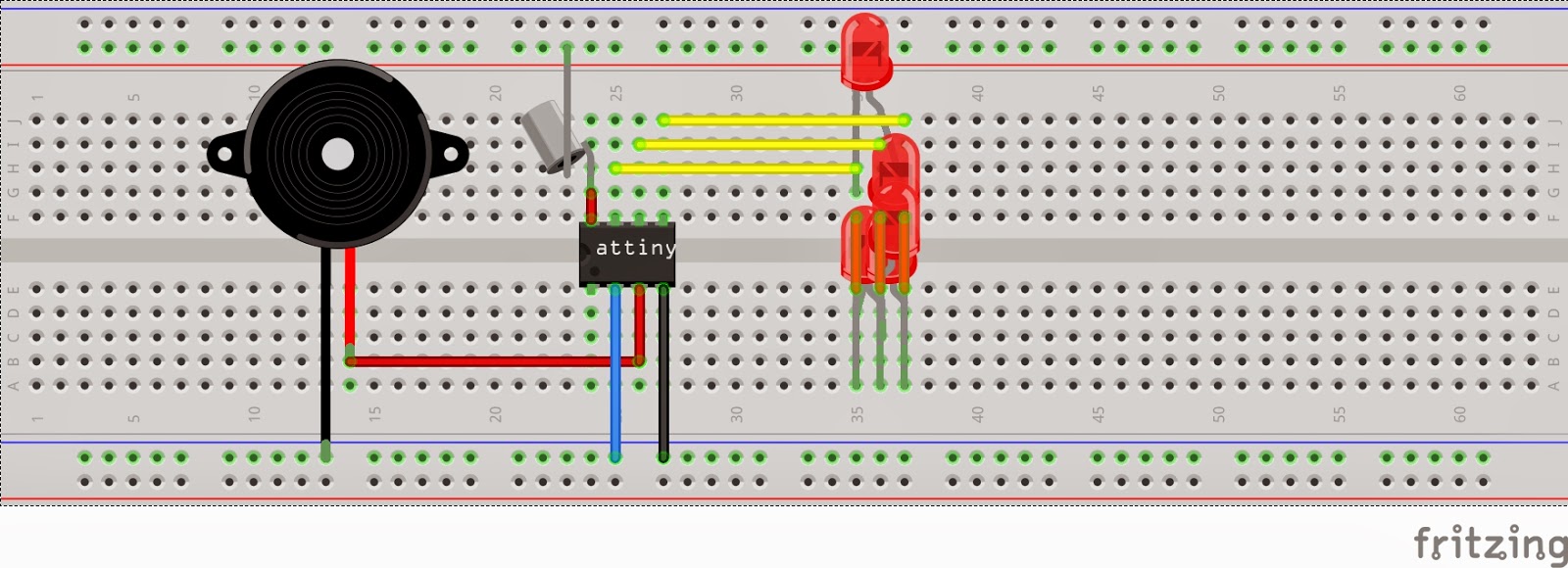


più comprensibile lo schema dei soli led recuperato direttamente dalla pagina di wikipedia qui sotto:


lo sketch è questo:

#include <avr/pgmspace.h>  //This is in the Arduino library

// inizio implementazione assert con output in compilazione
#define CONCAT_TOKENS( TokenA, TokenB )       TokenA ## TokenB
#define EXPAND_THEN_CONCAT( TokenA, TokenB )  CONCAT_TOKENS( TokenA, TokenB )
#define ASSERT( Expression )                  enum{ EXPAND_THEN_CONCAT( ASSERT_line_, __LINE__ ) = 1 / !!( Expression ) }
#define ASSERTM( Expression, Message )        enum{ EXPAND_THEN_CONCAT( Message ## _ASSERT_line_, __LINE__ ) = 1 / !!( Expression ) }
// fine implementazione assert con output in compilazione

#define ISDIGIT(n) (n >= '0' && n <= '9')

#define OCTAVE_OFFSET 0
#define SPEAKER_PIN 4
#define BUTTON_PIN 3

const int notes[] = { 0,
 262,  277,  294,  311,  330,  349,  370,  392,  415,  440,  466,  494, // 4
 523,  554,  587,  622,  659,  698,  740,  784,  831,  880,  932,  988, // 5
1047, 1109, 1175, 1245, 1319, 1397, 1480, 1568, 1661, 1760, 1865, 1976, // 6
2093, 2217, 2349, 2489, 2637, 2794, 2960, 3136, 3322, 3520, 3729, 3951, // 7
};

char *songs[] = {
  "R:d=4,o=5,b=160:8g,a,8g,e,c6,a,2g.,8g.,16a,8g.,16a,g,c6,1b,8f,g,8f,d,b,a,2g.,8g.,16a,8g.,16a,g,d6,2c.6",
  "J:d=4,o=5,b=112:8a,8a,a,8a,8a,a,8a,8c6,8f.,16g,2a,8a#,8a#,8a#.,16a#,8a#,8a,8a.,16a,8a,8g,8g,8a,g,c6",
  "W:d=8,o=5,b=140:4d,4g,g,a,g,f#,4e,4c,4e,4a,a,b,a,g,4f#,4d,4f#,4b,b,c6,b,a,4g,4e,4d,4e,4a,4f#,2g",
};
const char pins[] = {0, 1, 2};
const char ledPins[5][2] = {
  {0, 1},
  {1, 0},
  {1, 2},
  {2, 1},
  {2, 0},
};
byte giro = 0;
byte j = 0;
#define NUM_OF_SONGS 3
#define NUM_OF_PINS (sizeof(pins) / sizeof(char))
#define NUM_OF_LEDS 5
ASSERT(NUM_OF_LEDS <= (NUM_OF_PINS * (NUM_OF_PINS-1)));
void setup(void) {
  pinMode(SPEAKER_PIN, OUTPUT);
  pinMode(BUTTON_PIN, INPUT_PULLUP);
}
void loop(void) {
  alloff();
  if ( digitalRead(BUTTON_PIN) == LOW ) {
    play_rtttl(songs[giro]);
    giro = (giro < (NUM_OF_SONGS -1)) ? giro + 1 : 0;
  }
}
void play_rtttl(char *p) { // http://www.interactiondesign.se/wiki/attiny
  // Absolutely no error checking in here
  byte default_dur = 4;
  byte default_oct = 6;
  int bpm = 63;
  int num;
  long wholenote;
  long duration;
  byte note;
  byte scale;
  // format: d=N,o=N,b=NNN:
  // find the start (skip name, etc)
  // legge il titolo
  while(*p != ':') p++;    // ignore name
  p++;                     // skip ':'
  // get default duration
  if(*p == 'd') {
    p++; p++;              // skip "d="
    num = 0;
    while(ISDIGIT(*p)) {
      num = (num * 10) + (*p++ - '0');
    }
    if(num > 0) default_dur = num;
    p++;                   // skip comma
  }
  // get default octave
  if(*p == 'o') {
    p++; p++;              // skip "o="
    num = *p++ - '0';
    if(num >= 3 && num <=7) default_oct = num;
    p++;                   // skip comma
  }
  // get BPM
  if(*p == 'b') {
    p++; p++;              // skip "b="
    num = 0;
    while(ISDIGIT(*p)) {
      num = (num * 10) + (*p++ - '0');
    }
    bpm = num;
    p++;                   // skip colon
  }
  // quante note da un quarto stanno in un minuto
  wholenote = (60 * 1000L / bpm) * 4  ;  // this is the time for whole note (in milliseconds)
  // now begin note loop
  while(*p) {
    // first, get note duration, if available
    num = 0;
    while(ISDIGIT(*p)) {
      num = (num * 10) + (*p++ - '0');
    }

    if (num) duration = wholenote / num;
    else duration = wholenote / default_dur;  // we will need to check if we are a dotted note after
    // now get the note
    note = 0;
    switch(*p) {
      case 'c':
        note = 1;
        break;
      case 'd':
        note = 3;
        break;
      case 'e':
        note = 5;
        break;
      case 'f':
        note = 6;
        break;
      case 'g':
        note = 8;
        break;
      case 'a':
        note = 10;
        break;
      case 'b':
        note = 12;
        break;
      case 'p':
      default:
        note = 0;
    }
    p++;
    // now, get optional '#' sharp
    if(*p == '#') {
      note++;
      p++;
    }
    // now, get optional '.' dotted note
    if(*p == '.') {
      duration += duration/2;
      p++;
    }
    // now, get scale
    if(ISDIGIT(*p)) {
      scale = *p - '0';
      p++;
    } else {
      scale = default_oct;
    }
    scale += OCTAVE_OFFSET;
    if(*p == ',')
      p++;       // skip comma for next note (or we may be at the end)
    // now play the note
    if(note) {
      freqout(notes[(scale - 4) * 12 + note], duration);
    } else {
      delay(duration);
    }
  }
}
void freqout(int freq, int t) {
  freqout(freq, t, SPEAKER_PIN);
}
void freqout(int freq, int t, byte speaker) { // http://www.arduino.cc/playground/Main/Freqout
  turnon(random(0, NUM_OF_LEDS - 1));
  // freq in hz, t in ms
  const int hperiod = 500000 / freq - 7;              // subtract 7 us to make up for digitalWrite overhead
  const long cycles = ((long)freq * (long)t) / 1000;  // calculate cycles

  pinMode(SPEAKER_PIN, OUTPUT);                       // turn on output pin
  for (long i = 0; i <= cycles; i++) {                // play note for t ms  - SOFTWARE PWM?
    digitalWrite(SPEAKER_PIN, HIGH);
    delayMicroseconds(hperiod);
    digitalWrite(SPEAKER_PIN, LOW);
    delayMicroseconds(hperiod - 1);                   // - 1 to make up for digitaWrite overhead
  }
  pinMode(SPEAKER_PIN, INPUT);                        // shut off pin to avoid noise from other operations
//  alloff();
//  j = (j < (NUM_OF_LEDS - 1)) ? j + 1 : 0;
}

void turnon(int led) { // http://www.instructables.com/id/CharliePlexed-LED-string-for-the-Arduino/
  // This turns on a certian led from the list of leds
  int pospin = ledPins[led][0];
  int negpin = ledPins[led][1];
  pinMode (pospin, OUTPUT);
  digitalWrite (pospin, HIGH);
  pinMode (negpin, OUTPUT);
  digitalWrite (negpin, LOW);
}

void alloff() { // http://www.instructables.com/id/CharliePlexed-LED-string-for-the-Arduino/
  // This turns all the LED's off
  for(int i = 0; i < NUM_OF_PINS; i++)
    pinMode (pins[i], INPUT);
}


mercoledì 29 ottobre 2014

Imperial March, la Marcia Imperiale, come fa suonare un Attiny85

Come programmare un Attiny 85 lo potete scoprire QUI

L'attino ha un pallino, quello è il pin numero 1, gli altri pin fino al numero 8 si contano in senso antiorario. Lo schema è così composto:
pin 4 gnd
pin 8 vcc
pin 6 spk
come speaker ho adoperato un comune piezo elettrico
l'alimentazione è a 3 Volt con una 2032
lo scketch che ho caricato sull'attiny è questo qui sotto,
(come sempre prima sparare il bootloade, se restituisce errore riprovare all'inifinito, l'attino è impostato a 8mega)


___________________________________________________________
const int Note_C  = 239;
const int Note_CS = 225;
const int Note_D  = 213;
const int Note_DS = 201;
const int Note_E  = 190;
const int Note_F  = 179;
const int Note_FS = 169;
const int Note_G  = 159;
const int Note_GS = 150;
const int Note_A  = 142;
const int Note_AS = 134;
const int Note_B  = 127;

int Speaker = 1;

void setup()
{
  pinMode(Speaker, OUTPUT);
}

void loop()
{
  playTune();
  delay(10000);
}

void TinyTone(unsigned char divisor, unsigned char octave, unsigned long duration)
{
//  TCCR1 = 0x90 | (8-octave); // for 1MHz clock
   TCCR1 = 0x90 | (11-octave); // for 8MHz clock
  OCR1C = divisor-1;         // set the OCR
  delay(duration);
  TCCR1 = 0x90;              // stop the counter
}

// Play a scale
void playTune(void)
{
 TinyTone(Note_G, 4, 500);//SOL
 TinyTone(Note_G, 1, 50);
 TinyTone(Note_G, 4, 500);//SOL
 TinyTone(Note_G, 1, 50);
 TinyTone(Note_G, 4, 500);//SOL
 TinyTone(Note_G, 1, 50);
 TinyTone(Note_DS, 4, 375);//RED
 TinyTone(Note_DS, 1, 50);
 TinyTone(Note_AS, 4, 125);//LAD
 TinyTone(Note_AS, 1, 50);
 //*********
 TinyTone(Note_G, 4, 500);//SOL
 TinyTone(Note_G, 1, 50);
  TinyTone(Note_DS, 4, 375);//RED
 TinyTone(Note_DS, 1, 50);
 TinyTone(Note_AS, 4, 125);//LAD
 TinyTone(Note_AS, 1, 50);
 TinyTone(Note_G, 4, 1000);//SOL
 TinyTone(Note_G, 1, 50);
 //****************************
 TinyTone(Note_D, 5, 500);//RE
 TinyTone(Note_D, 1, 50);
  TinyTone(Note_D, 5, 500);//RE
 TinyTone(Note_D, 1, 50);
  TinyTone(Note_D, 5, 500);//RE
 TinyTone(Note_D, 1, 50);
  TinyTone(Note_DS, 5, 375);//RED
 TinyTone(Note_DS, 1, 50);
  TinyTone(Note_AS, 4, 125);//LAD
 TinyTone(Note_AS, 1, 50);
 //******
  TinyTone(Note_G, 4, 500);//SOL
 TinyTone(Note_G, 1, 50);
 TinyTone(Note_DS, 4, 375);//RED
 TinyTone(Note_DS, 1, 50);
  TinyTone(Note_AS, 4, 125);//LAD
 TinyTone(Note_AS, 1, 50);
 TinyTone(Note_G, 4, 1000);//SOL
 TinyTone(Note_G, 1, 50);
 //*****
  TinyTone(Note_G, 5, 500);//SOL
 TinyTone(Note_G, 1, 50);
 TinyTone(Note_G, 4, 375);//SOL
 TinyTone(Note_G, 1, 50);
 TinyTone(Note_G, 4, 125);//SOL
 TinyTone(Note_G, 1, 50);
 TinyTone(Note_G, 5, 500);//SOL
 TinyTone(Note_G, 1, 50);
 TinyTone(Note_FS, 5, 375);//FAD
 TinyTone(Note_FS, 1, 50);
  TinyTone(Note_F, 5, 125);//FA
 TinyTone(Note_F, 1, 50);
 //*****
 TinyTone(Note_E, 5, 125);//MI
 TinyTone(Note_E, 1, 50);
 TinyTone(Note_DS, 5, 125);//RE
 TinyTone(Note_DS, 1, 50);
  TinyTone(Note_E, 5, 250);//MI
 TinyTone(Note_E, 1, 250);
 TinyTone(Note_GS, 4, 250);//SOLDIESI UN OTTAVO
 TinyTone(Note_GS, 1, 50);
 TinyTone(Note_CS, 5, 500);//DODIESIS
 TinyTone(Note_CS, 1, 50);
  TinyTone(Note_C, 5, 375);//DO
 TinyTone(Note_C, 1, 50);
 TinyTone(Note_B, 4, 125);//SI
 TinyTone(Note_B, 1, 50);
 //******
  TinyTone(Note_AS, 4, 125);//LAD
 TinyTone(Note_AS, 1, 50);
  TinyTone(Note_A, 4, 125);//LA
 TinyTone(Note_A, 1, 50);
 TinyTone(Note_AS, 4, 125);//LAD
 TinyTone(Note_AS, 1, 375);
 TinyTone(Note_DS, 4, 250);//MID
 TinyTone(Note_DS, 1, 50);
 TinyTone(Note_FS, 4, 500);//FAD
 TinyTone(Note_FS, 1, 50);
 TinyTone(Note_DS, 4, 375);//MID
 TinyTone(Note_DS, 1, 50);
 TinyTone(Note_FS, 4, 125);//FAD
 TinyTone(Note_FS, 1, 50);
 //*******
 TinyTone(Note_AS, 4, 500);//LAD
 TinyTone(Note_AS, 1, 50);
 TinyTone(Note_G, 4, 375);//SOL
 TinyTone(Note_G, 1, 50);
 TinyTone(Note_AS, 4, 125);//LAD
 TinyTone(Note_AS, 1, 50);
 TinyTone(Note_D, 5, 1000);//LAD
 TinyTone(Note_D, 1, 50);

 //RIPRESA

 //*****
  TinyTone(Note_G, 5, 500);//SOL
 TinyTone(Note_G, 1, 50);
 TinyTone(Note_G, 4, 375);//SOL
 TinyTone(Note_G, 1, 50);
 TinyTone(Note_G, 4, 125);//SOL
 TinyTone(Note_G, 1, 50);
 TinyTone(Note_G, 5, 500);//SOL
 TinyTone(Note_G, 1, 50);
 TinyTone(Note_FS, 5, 375);//FAD
 TinyTone(Note_FS, 1, 50);
  TinyTone(Note_F, 5, 125);//FA
 TinyTone(Note_F, 1, 50);
 //*****
 TinyTone(Note_E, 5, 125);//MI
 TinyTone(Note_E, 1, 50);
 TinyTone(Note_DS, 5, 125);//RE
 TinyTone(Note_DS, 1, 50);
  TinyTone(Note_E, 5, 250);//MI
 TinyTone(Note_E, 1, 250);
 TinyTone(Note_GS, 4, 250);//SOLDIESI UN OTTAVO
 TinyTone(Note_GS, 1, 50);
 TinyTone(Note_CS, 5, 500);//DODIESIS
 TinyTone(Note_CS, 1, 50);
  TinyTone(Note_C, 5, 375);//DO
 TinyTone(Note_C, 1, 50);
 TinyTone(Note_B, 4, 125);//SI
 TinyTone(Note_B, 1, 50);
 //******
  TinyTone(Note_AS, 4, 125);//LAD
 TinyTone(Note_AS, 1, 50);
  TinyTone(Note_A, 4, 125);//LA
 TinyTone(Note_A, 1, 50);
 TinyTone(Note_AS, 4, 125);//LAD
 TinyTone(Note_AS, 1, 375);
 TinyTone(Note_DS, 4, 250);//MID
 TinyTone(Note_DS, 1, 50);
 TinyTone(Note_FS, 4, 500);//FAD
 TinyTone(Note_FS, 1, 50);
 TinyTone(Note_DS, 4, 375);//MID
 TinyTone(Note_DS, 1, 50);
 TinyTone(Note_FS, 4, 125);//FAD
 TinyTone(Note_FS, 1, 50);
 //****
 TinyTone(Note_G, 4, 500);//SOL
 TinyTone(Note_G, 1, 50);
 TinyTone(Note_FS, 4, 375);//FAD
 TinyTone(Note_FS, 1, 50);
 TinyTone(Note_AS, 4, 125);//LAD
 TinyTone(Note_AS, 1, 50);
 TinyTone(Note_G, 4, 1000);//SOL
 //TinyTone(Note_G, 1, 50);

}


venerdì 17 ottobre 2014

Attiny 85 e servomotore: amore possibile!

Per muovere un servomotore ci vuole una libreria apposta per Attiny, la Softwareservo.h,
per la programmazione dell'Attiny  vi rimando qui.
Lo schema qui sotto:


qui il codice ad esempio per il Knob:


#include <SoftwareServo.h>

#define PIN_SERVO 0
#define PIN_POT 2
#define PULSE_MIN 600 // in microsecs
#define PULSE_MAX 2400 // in microsecs
#define READINGS_COUNT 10

SoftwareServo servo;
long potValue = 0;
int readings[READINGS_COUNT] = {0, 0, 0, 0, 0, 0, 0, 0, 0, 0};
byte readingsPos = 0;
unsigned long nextReadingDue = 0;

void setup(){
servo.attach(PIN_SERVO);
servo.setMinimumPulse(PULSE_MIN);
servo.setMaximumPulse(PULSE_MAX);
}

void loop(){
// read the analog pin once every millisec, and store the data until we have enough to filter
unsigned long currentTime = micros();
if(currentTime > nextReadingDue){
readings[readingsPos] = analogRead(PIN_POT);
readingsPos ++;

nextReadingDue = currentTime + 1000;
}

// once every READINGS_COUNT readings, clean the data and update the servo
// also filter using weighted moving average to avoid excessive jittering due to poor potentiometer
if(readingsPos > READINGS_COUNT){
potValue = (9 * potValue + getCleanReading())/ 10;

servo.write(map(potValue, 0, 1023, 0, 180));

readingsPos = 0;
}

// good to call this as often as we can, so that we don't miss the moment when the signal has to go up or down
SoftwareServo::refresh();
}

// reads several analog values and tries to do some smart filtering
int getCleanReading(){
int reading, minReading=9999, maxReading=0;
long result = 0;

for(byte i=0; i<READINGS_COUNT; i++){
readings[i] = analogRead(PIN_POT);
result += readings[i];

if(readings[i] < minReading){
minReading = readings[i];
}
if(readings[i] > maxReading){
maxReading = readings[i];
}
}

// reaturn the average after eliminating min and max readings
return (result - minReading - maxReading) / (READINGS_COUNT - 2);
}


Anche io POV con Attiny

POV: Persistence of Vision
è quel fenomeno per cui, se vi sventolate una mano davanti alla faccia, vedete un sacco di dita...
lo state facendo adesso vero?
sfruttando questo fenomeno possiamo per esempio riprodurre dei caratteri grafici componendoli "una colonna alla volta" e spostandoci poi di un'altra colonna...


Chi fa questa cosa? Questo arnese qui:
Da sinistra: le batterie (3V sono sufficienti) l'interruttore, l'attiny 85 e i 5 led collegati.

che post di merda che sto scrivendo.

La scritta "Ciao belli!" manca la lettera C, c'era un piccolo bug risolto...
Questo è lo schema, sotto aggiungo il codice. ciao, arrangiatevi.


lunedì 21 gennaio 2013

Franken-ISP

Franken-ISP,
il programmatore di ATtiny del Frankenstein Garage,
mi è stato consegnato venerdì per fare alcune prove "for Dummies" ma io evidentemente sono oltre
infatti non riesco ancora a farla riconoscere ad Ubuntu, ma questo credo sia un problema tutto mio.
Ad ogni modo nelle mie speranze ci sono, giusto per cominciare, un paio di progetti recuperati come spesso accade dal preziosissimo contributo di Instructables.
I due progettini sono questi qui:
Una candela senza fiamma (ovviamente a LED)
http://www.instructables.com/id/Flameless-candle-from-an-attiny13/ ed un paio di realizzazioni, sempre a LED, per qualche effetto carino
http://www.instructables.com/id/3-Easy-ATTiny-Holiday-Gifts/